
Overview
Find out what happened to one customer record as it crossed your services, and where its data changed.
Free, self-hosted, and small enough to run on a laptop. No account, no hosted service, and nothing captured is sent anywhere you did not configure.
Wayscribe was called Flight Recorder until September 2026.
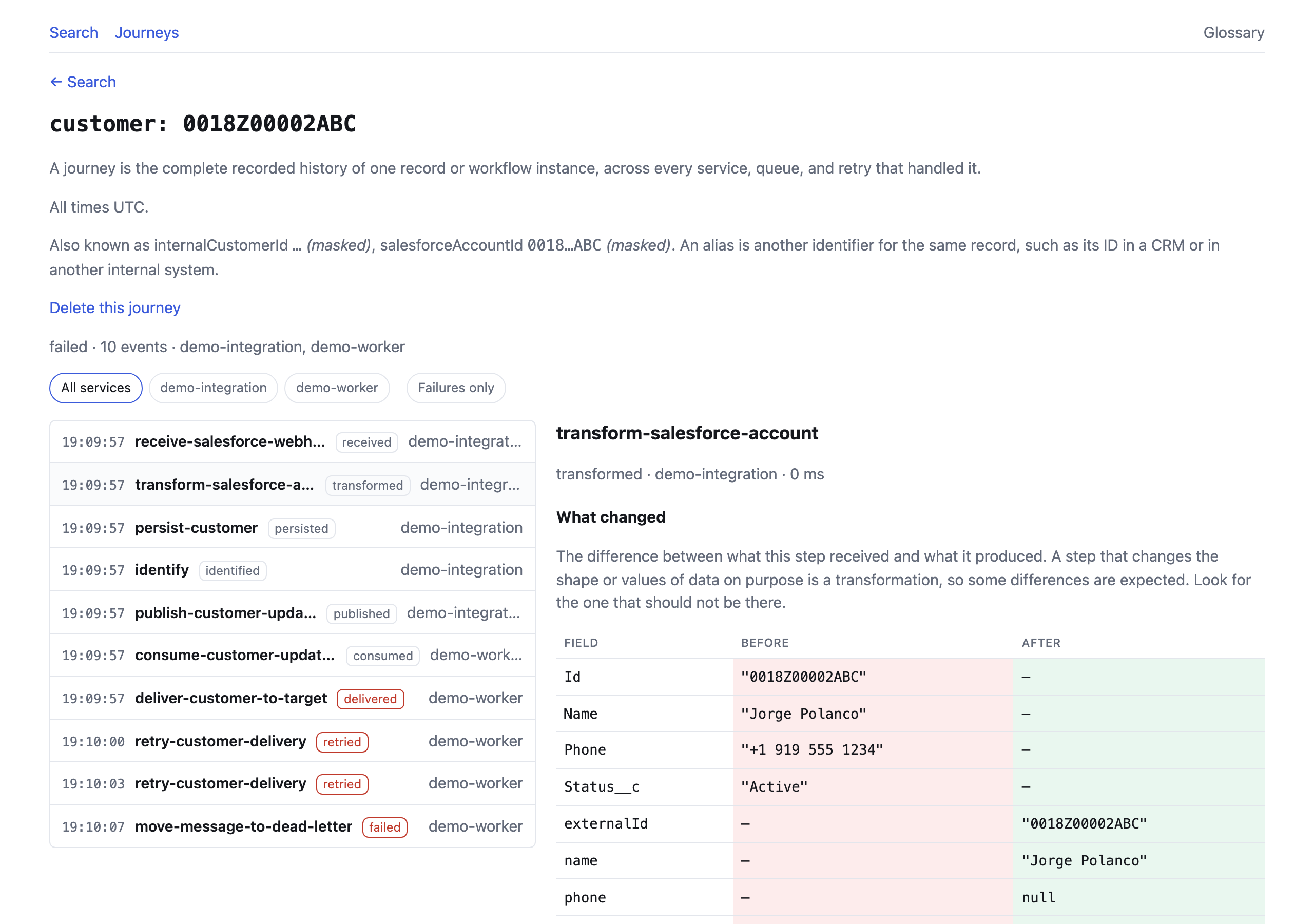
One record, every service that touched it, and the step where the value was
lost. Regenerate with pnpm screenshots.
Development happens on GitLab. Issues and merge requests go there. Any GitHub repository is a read-only mirror; see docs/MIRRORING.md.
If you only read one thing, read the decision log. Every architecture decision, with the reasoning kept in, including why redaction matches key names at any depth after a live credential leak was found in it, and why replay connects to a resolved address rather than a hostname. Several record decisions that were wrong the first time and say so.
What running it found is the companion:
the defects that were live in main with a green test suite, why the tests
missed them, and what changed in how this is tested as a result.
The problem
Section titled “The problem”A customer calls. Their phone number is missing in your CRM.
That record arrived through a webhook, went through a transformation, landed in
PostgreSQL, went onto a queue, was picked up by a worker, and was pushed to a
third-party API. Six services. Somewhere in there the phone number became
null.
You have logs. They are in six places, keyed by request ID, and none of them knows that customer by name. You may have traces: spans and latencies, which tell you the call succeeded and nothing about what it carried.
So you start grepping.
Wayscribe is built for that exact half hour. Search the customer. Read the timeline. Look at the step where the value changed.
What you actually get
Section titled “What you actually get”Search 0018Z00002ABC and you get one record’s history, in order, across every
service that touched it:
received receive-salesforce-webhook demo-integrationtransformed transform-salesforce-account demo-integrationpersisted persist-customer demo-integrationidentified identify demo-integrationpublished publish-customer-updated demo-integrationconsumed consume-customer-updated demo-workerdelivered deliver-customer-to-target demo-worker 422retried retry-customer-delivery demo-worker 422retried retry-customer-delivery demo-worker 422failed move-message-to-dead-letter demo-workerOpen the transformation and you get a field-level diff of what that step received against what it produced:
| Field | Before | After |
|---|---|---|
Id |
"0018Z00002ABC" |
(absent) |
Name |
"Jorge Polanco" |
(absent) |
Phone |
"+1 919 555 1234" |
(absent) |
Status__c |
"Active" |
(absent) |
externalId |
(absent) | "0018Z00002ABC" |
name |
(absent) | "Jorge Polanco" |
phone |
(absent) | null |
status |
(absent) | "active" |
There it is. Phone went in carrying a value and phone came out null, while
every other field arrived intact. That pair is the bug: a mapping reading
Phone__c from a payload that carries Phone.
Then replay the original input against your corrected code and compare:
| Field | Before | After |
|---|---|---|
phone |
null |
"+1 919 555 1234" |
One changed field. The fix works, tested against the input that actually failed.
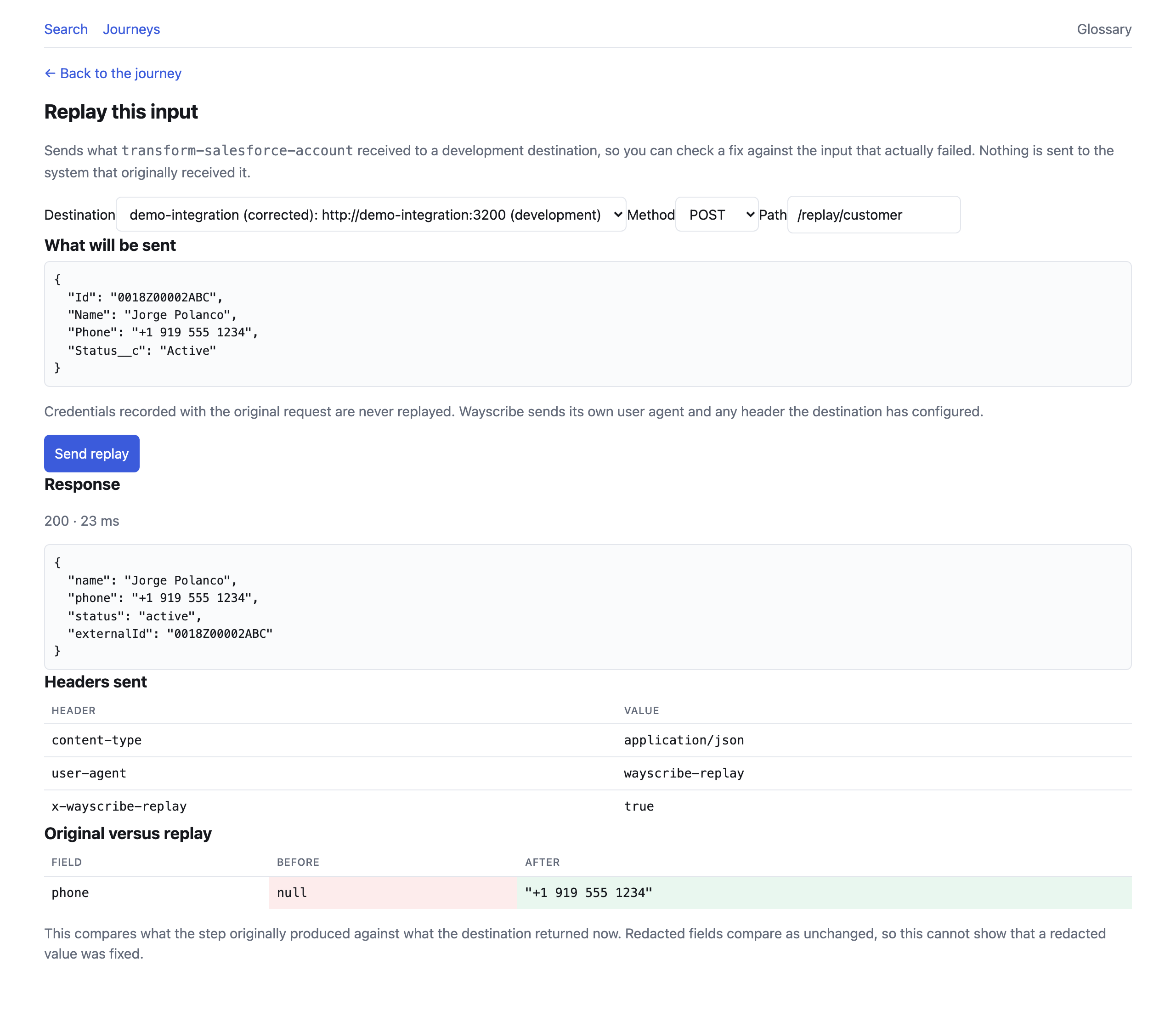
Nothing is sent until you have read what will be sent, and the destination has to be on an allowlist. Replay to production is not supported.
That is the whole loop: find where the value was lost, then prove the fix.
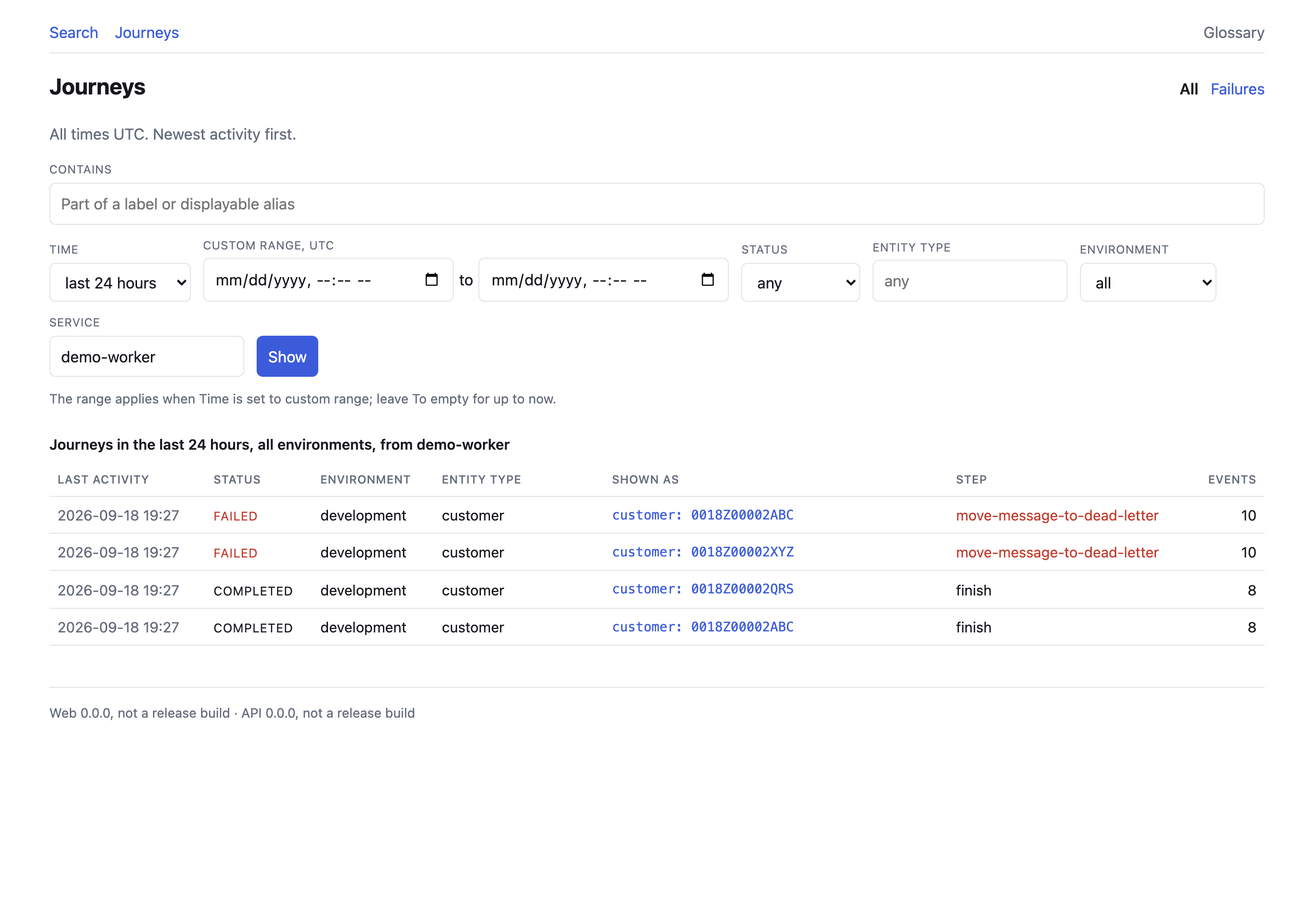
No identifier yet, only an alert that deliveries are failing? The Journeys page lists what happened in the last hour, day, week or month, or in a range you choose, narrowed by status, entity type, environment, service, or part of a journey’s label or displayable alias. Its Failures shortcut shows only what failed, and each row opens the same timeline.
Try it
Section titled “Try it”You need Docker with Compose. Nothing else: no Node, no database, no account.
git clone https://gitlab.com/jojithedev/wayscribe.git && cd wayscribedocker compose -f infrastructure/compose.yaml \ -f infrastructure/compose.demo.yaml up --buildThat builds the images and boots the API, the interface, PostgreSQL, a queue, and four demo services that bring their own broken integration to investigate. Measured on 2026-09-14 from a fresh clone on a laptop with no Docker layer cache, the build took 38 seconds and the boot 12; the first run also downloads the base images.
Then start a journey:
curl -X POST http://localhost:3100/triggerFour demo services move a Salesforce account through a webhook, a
transformation, PostgreSQL, a queue, a worker, and a third-party API. The
transformation contains a real defect, the queue really retries, and the target
really rejects the result with a 422. About ten seconds after the trigger the
journey has reached its dead-letter state: the demo queue redelivers after 3
seconds and dead-letters on the third receive
(elasticmq.conf).
Open http://localhost:3000 and sign in with the admin token, which is
replace-for-local-development-0000 until you set your own (below). Search
0018Z00002ABC. That is the journey above. (pnpm demo:trigger does the same
as the curl and prints the direct link, if you have Node 24 and pnpm.)
The API binds 127.0.0.1:8080 and the interface 127.0.0.1:3000. If either
port is taken on your machine, move it:
API_PORT=8081 WEB_PORT=3001 docker compose -f infrastructure/compose.yaml \ -f infrastructure/compose.demo.yaml up --buildSet your own ADMIN_TOKEN and ENCRYPTION_KEY before this holds anything real:
cp .env.example .env && printf 'ENCRYPTION_KEY=%s\nADMIN_TOKEN=%s\n' "$(openssl rand -hex 32)" "$(openssl rand -hex 32)" >> .envRecreate the stack with the same up command for them to take effect. What the
demo already recorded stays under the default key, which the new one cannot
read; start from an empty database with down -v first if that matters. The
API logs a warning at every boot while the published development defaults are
still in use.
Supported versions
Section titled “Supported versions”Each row says what is supported and what CI actually runs, which are not always
the same thing. tests/supported-versions.test.ts fails when this table
disagrees with .gitlab-ci.yml or with the engines fields.
| Component | Supported | What CI tests |
|---|---|---|
| Node.js for the SDK and the CLI | 22.12 or later | 22.12.0 and 24: the SDK’s build and unit tests, the CLI’s unit tests, and import and require() of the packed SDK tarball in fresh projects (sdk-node) |
| Node.js for running from a clone | 24 | 24: every other job runs on node:24 or node:24-alpine |
| PostgreSQL | 15 or later | 15, 17 and 18: the whole integration suite, migrations included (database). 16 is not run; it lies between two releases that are |
| Docker Compose | 2.24 or later | not pinned: the manual demo job and the release gate use Alpine’s current docker-cli-compose. 2.24 is the oldest Compose that reads env_file with required: false, which the Compose files use |
| Container images | linux/amd64, linux/arm64 | the runner’s own architecture only: container-scan builds and scans both images on default-branch pipelines. Releases build both platforms; the arm64 images are not run in CI |
doctor fails on PostgreSQL older than 15 and warns on a release newer than
the newest one CI tests.
Instrument your own service
Section titled “Instrument your own service”For a common stack, start from a recipe.
The SDK is not published to npm yet. Until it is, pack it from a clone of this repository, commit the tarball to your application, and depend on it by path:
pnpm installpnpm --silent --filter @wayscribe/node run pack:release /path/to/your-app/vendor/cd /path/to/your-appnpm install ./vendor/wayscribe-node-0.1.0.tgz # records "file:vendor/…tgz"A tarball is a built copy that travels with your application. A path into the
clone instead links to a directory whose build output is not in git, which
breaks on the next git clean, branch switch, or machine without the clone,
and nothing rebuilds it for a job that has no build step of its own. After
pulling a change that adds or updates the tarball, run npm ci before the job
runs again; a deploy that skipped it hung. The
SDK README has the
details. Once the package is published, all of this becomes
npm install @wayscribe/node.
import { createRecorder } from "@wayscribe/node";
const recorder = createRecorder({  endpoint: "http://localhost:8080",  apiKey: process.env.WAYSCRIBE_API_KEY,  serviceName: "billing-api",  environment: "development",  // Prints `delivered_first` once events are stored, or why they are not.  // Turn it off once the service is known to send.  logDiagnostics: true});
// A journey is one record's history. The entity is what you will search for.const journey = recorder.startJourney({  entity: { type: "customer", id: account.Id }});
// Each wrapper runs your code, returns its value unchanged, and records what// went in and what came out. The difference between those two is the point.const customer = await journey.transform("map-account", account, () =>  toCustomer(account));
const id = await journey.persist("save-customer", customer, () =>  db.customers.insert(customer));
// Aliases are the other identifiers this record answers to. Now a colleague who// only has the internal ID can still find this journey.journey.identify({ internalCustomerId: String(id) });
Then search for account.Id. Or the internal ID. Or any other identifier you
attached.
examples/instrument-a-service is a standalone
project that does this end to end, including the part where a value goes
missing; the instrumentation in it is about thirty lines.
The SDK cannot break your application
Section titled “The SDK cannot break your application”An observability library that takes down the service it observes is worse than no library. This one is built so that cannot happen:
- No runtime dependencies. It brings nothing with it.
- Every entry point is wrapped. A recorder failure increments a counter and returns; it never reaches your code.
- Wrappers rethrow your exact error object, so
instanceofchecks and custom properties on your errors keep working. - The event queue is bounded, and drops oldest under backpressure rather than growing without limit.
- The transport retries behind a circuit breaker and gives up rather than piling up.
shutdown()races the final flush against a timeout and never hangs.- Nothing is written to your console unless you ask for it, apart from six
warnings printed once per process: a required setting that is missing or
empty, an optional setting the recorder could not use, a setting under its
old name, a
journeyIdSecretthat cannot be used, a field whose name looks like a secret that was sent in plain text, and a journey label or displayable alias that looks like personal data (SDK README).
Why this is not tracing
Section titled “Why this is not tracing”Tracing answers “which call was slow, and did it succeed?” Wayscribe answers “what happened to this record, and where did its data change?” Both are useful. They are not the same question.
| Wayscribe | APM / tracing | |
|---|---|---|
| You search by | a customer, order, or invoice ID | a trace ID or a service |
| The unit is | one record’s journey | one request’s spans |
| It shows you | what the payload was, field by field | latency, status, structure |
| Correlation is | deterministic, by entity and alias | by propagated trace context |
| It answers | “where did this value change?” | “which call was slow?” |
Five things this does that a tracing tool does not:
- Record-first navigation. You search for a customer, not a trace.
- Identity mapping. One record is a Salesforce ID here, an internal ID there, a queue message ID in between. Search any of them and get the same journey.
- Field-level transformation diffs. Structural rather than textual
(
{path, kind, before, after}), because input and output routinely use different field names, and a unified−/+view would have to pick one and mislead about the other. - Works with the architecture you already have. Webhooks, PostgreSQL, queues, workers, third-party APIs. No rewrite, no service mesh, no agent.
- Journey-linked safe replay. Rerun the exact recorded input against a development destination and diff the result.
It is not a replacement for OpenTelemetry. When OTel is present, the SDK
reads the active trace and span IDs onto each event so you can pivot between the
two. It does not write traceparent; OTel owns that header.
Alternatives
Section titled “Alternatives”As of September 2026, I have not found an open-source tool that does all four for services you already run: (1) follow one record by its business id and aliases across services; (2) capture what each step received and produced and show the field that changed; (3) replay a recorded input against development; (4) with no platform to move onto.
Several open-source tools do part of it:
| Tool | What it does | What it lacks for this job |
|---|---|---|
| Apache NiFi provenance | Finds a piece of data, shows it at each step, replays it | Only data moving through a NiFi dataflow |
| Workflow engines such as Temporal | Keep each execution’s inputs and results, searchable | Only code written as their workflows |
| Tracing backends such as Jaeger or Grafana Tempo | Find traces by span attribute, such as an order id | No documented capture of step payloads, field diff or replay |
| Webhook servers such as Svix | Deliver webhooks with retries | Only the webhook, not the steps around it |
| Model-history libraries such as PaperTrail or django-simple-history | Record before and after values of a model’s fields | One application’s database models only |
| Traffic capture and replay such as Keploy and Kubeshark | Record traffic; Keploy replays it as tests | No record history by business id across services |
| Lineage standards such as OpenLineage | Lineage of jobs, runs and datasets | No single record in the model |
Convoy, Bemi and n8n come close to parts of this and are source-available rather than OSI open source. Commercial tools such as Nodinite, Turbo360, Particular ServicePulse, Dynatrace Business Flow and the hosted tracing backends, Honeycomb among them, do this job on their own platforms, which shows teams pay for it.
docs/ALTERNATIVES.md has the licence, the overlap and the gap for each, with a source and the date it was checked. If a tool does all four, this claim is wrong: please open an issue with a link to it.
How it works
Section titled “How it works”your services ──SDK──▶ API ──▶ PostgreSQL │ └──▶ web interfaceThat is the entire architecture. PostgreSQL is the only required backing service: no Kafka, no Elasticsearch, no object store, no sidecar, no agent.
- Events are captured synchronously, so the recorded payload is what the step actually saw, then batched and sent in the background.
- Payloads are redacted inside your process, before they leave it, against a built-in list of secret-looking paths. Paths you add are appended to that list rather than replacing it, so adding one cannot silently disable the rest.
- Entity identifiers and alias values are encrypted at rest. Payloads are
not: they are stored as
jsonb, which is exactly why redaction runs before they leave your process and again before they are written. Two things the instrumenting code declares public are also kept in plain text so they can be found by partial text: a journey’s label, and a copy of each alias value it marked displayable (SECURITY.md section 6). - Search uses HMAC tokens, so an identifier is findable without being stored in the clear.
- Every encrypted value names the key that wrote it, so
ENCRYPTION_KEYrotates through a grace period instead of costing the data already stored: the old key stays readable whilerotate:reencryptmoves everything across. - Cross-project isolation is structural: composite primary and foreign keys make one project’s key reaching another project’s data unrepresentable, rather than something every query has to remember to check.
- Replay resolves a hostname once and connects to that address, so a name that passes the allowlist cannot answer differently a moment later.
- Retention sweeps per environment, on an interval, inside the API process.
Every non-obvious decision is written down with its reasoning in the decision log: 63 ADRs, including the several that were wrong the first time and say so.
Status
Section titled “Status”Pre-release. It runs from a clone; nothing is published yet.
Ingestion, search, journey timelines, field-level diffs, the Node SDK, cross-process propagation, retention, the demo, development replay, and a read-only CLI are built, tested, and running. Container images and the npm package are not published, so today you install by cloning this repository.
An adversarial audit of the first-contact experience on 2026-08-09 found that
the demo which verified all of it was systematically narrow: ten flat
plain-JSON events that never contained a Date, a shared object reference, a
control character, a 101st event, or a rejected one. Thirty claims were raised,
twenty-eight survived a refutation pass, and three affected the correctness of
what you see: the diff turned a Date into {} and reported a shared reference
as a change, a rejected event counted as sent, and one unstorable value stalled
the SDK’s queue for the life of the process.
Every one of them was fixed the same day, with the twelve smaller findings. The fixed SDK was then pointed at a service this repository’s authors had not written, with a real ORM, which found four more, including a credential leak in the redaction itself. Those are fixed too. The whole account, and what changed about how this is tested because of it, is in What running it found. Nothing from that account remains open. Captured data can be deleted on demand (ADR-045), and credentials inside error messages are masked by shape, which catches the common ones and not a credential in an unfamiliar shape (ADR-046). The roadmap lists what is still known to be missing.
CHANGELOG.md lists what is done and what is known to be missing.
The install that replaces the clone is already written and waiting on that publish; it is below, under its own heading, so it is never read as today’s instructions.
Installing without a checkout, once the images are published
Section titled “Installing without a checkout, once the images are published”This does not work yet. The container images and the npm package are not published. Until they are, use Try it, which runs from a clone.
infrastructure/compose.published.yaml
will pull the images, migrate on first boot, and need no checkout.
Wayscribe keeps everything in one PostgreSQL database, 15 or later, and expects you to bring your own: the one your team already backs up, monitors, and holds the credentials for.
curl -O https://gitlab.com/jojithedev/wayscribe/-/raw/main/infrastructure/compose.published.yamlexport COMPOSE_FILE=compose.published.yamlexport WAYSCRIBE_VERSION=vX.Y.Z   # the release to run; releases are 0.x
export DATABASE_URL=postgresql://user:password@db.internal:5432/wayscribeexport ENCRYPTION_KEY=$(openssl rand -hex 32)export ADMIN_TOKEN=$(openssl rand -hex 32)docker compose up -d
COMPOSE_FILE names the files every docker compose command in this shell
reads, so the commands below always see the same stack you started.
WAYSCRIBE_VERSION is required: the file has no latest fallback,
because the migrate service applies the schema of whatever image it pulls,
and an unpinned pull could move your database across a minor release. Export
both again in a new shell.
To try it without standing a database up first, add the bundled overlay to that
list. It runs PostgreSQL alongside and sets DATABASE_URL for you:
curl -O https://gitlab.com/jojithedev/wayscribe/-/raw/main/infrastructure/compose.bundled.yamlexport COMPOSE_FILE=compose.published.yaml:compose.bundled.yamldocker compose up -dA command that leaves the overlay out reports the PostgreSQL container as an
orphan and suggests --remove-orphans. Do not take that advice: it removes the
database container.
A new installation has no projects. Create the one you are about to instrument, and issue it a key. The same image carries the CLI, so this still needs no checkout:
docker compose run --rm --entrypoint node api \  packages/database/dist/cli.js project:create acme "Acme Payments"
docker compose run --rm --entrypoint node api \  packages/database/dist/cli.js key:create acme production checkout-worker
The key is printed once. Before giving it to anything, check the installation with it:
docker compose run --rm --entrypoint node api \ packages/database/dist/cli.js doctor --api-url http://api:8080 --api-key wsk_…doctor prints one line per check (the database, migrations, default secrets,
keys, the API) and the fix for anything that fails, and exits 1 if anything did
(Operations §12). Then give
the key to your service as WAYSCRIBE_API_KEY and follow
Instrument your own service.
Not in V0
Section titled “Not in V0”No AI features in V0. A future bring-your-own-key layer may be added as an optional, disabled-by-default module. It will never be required, and nothing will be sent anywhere by default.
What “done” means for the first release
Section titled “What “done” means for the first release”A developer can instrument an existing Node.js integration, search for one customer, reconstruct its journey across an API, database, queue, worker, and external service, see exactly where its data changed, understand the recorded failure, and safely rerun the original input against a development endpoint.
Anything not required to make that sentence true is postponed.
The promise this is built toward is find where a record was changed, lost, duplicated, delayed, or rejected. Of those five, changed and rejected are demonstrated end to end today, and delay is visible in the timeline as recorded durations and gaps. Duplication and loss are not yet first-class.
What Wayscribe is not
Section titled “What Wayscribe is not”- an application performance monitoring platform
- a log aggregator
- a workflow engine
- an integration builder
- a replacement for OpenTelemetry
- a data warehouse lineage platform
- a production event replay system
- an AI incident agent
It observes workflows that already exist.
One caution worth reading. Wayscribe records the contents of your
integration payloads. Treat its database as holding whatever your workflows
carry. If that includes regulated data, review captureMode first:
metadata-only records the shape of a journey without storing payloads at all.
Free, and staying that way
Section titled “Free, and staying that way”Apache-2.0. The self-hosted core is free and always will be: event ingestion, entity and alias search, journey timelines, transformation diffs, error and retry inspection, development replay, and retention controls require no payment and no hosted account.
Private by default. No captured data is sent to an external service. The
running services send no telemetry and no analytics, and make no outbound
connection other than the ones your own configuration creates. Building the
images is not offline: it downloads base images, Alpine packages and npm
packages. Next.js’s build telemetry is switched off
(NEXT_TELEMETRY_DISABLED=1) in the web image and in the web package’s
scripts.
The reasoning is recorded in product principles and in ADR-011 and ADR-014 of the decision log.
Documentation
Section titled “Documentation”| Document | Purpose |
|---|---|
| Local development | Setup, commands, keys, troubleshooting |
| Operations | Backup, restore, upgrade, key rotation, retention, deleting data, doctor, metrics |
| Node SDK | The SDK’s full surface |
| SDK specification | What a recorder in any language must do, as numbered requirements with a source for each |
| Demo scenario | The reference journey, end to end |
| Architecture | Components, flows, boundaries, scaling path |
| Event protocol | The journey event contract |
| Ingestion contract | Normative for the two ingestion routes: limits, refusals, idempotency, the dry run, and the conformance case format |
| API specification | HTTP API contracts |
| Database schema | Tables, indexes, constraints, retention |
| Replay specification | Replay rules and safeguards |
| Security | Threat model and data handling |
| Security policy | Reporting a vulnerability, and what is in scope |
| Troubleshooting | No journeys appear: /ready, doctor, delivered_first, diagnostic and refusal codes, key and environment mismatches |
| FAQ | OpenTelemetry, overhead, storage, search speed, outages, erasure, PostgreSQL versions, license; measured numbers with sources |
| Recipes | Express + BullMQ + HubSpot, Fastify + SQS + Salesforce, Next.js + Stripe webhooks; type-checked against the SDK |
| Security review packet | One page for a pilot team’s security reviewer: data, auth, deletion, supply chain, known gaps |
| Decision log | Every architectural decision, and why |
| Product principles | The non-negotiables |
| Product specification | Problem, users, requirements, V0 boundaries |
| Testing strategy | Unit, integration, browser, acceptance |
| Task list | Implementation checklist and current state |
| Roadmap | Beyond the first release |
| Alternatives | The closest open-source and commercial tools, with sources |
| Changelog | What changed, and what does not work yet |
| Contributing | How to help |
| Mirroring | How the GitHub mirror works, and why it is a CI job |
| Glossary | Shared terminology |
Built with
Section titled “Built with”TypeScript · Node 24 · pnpm workspaces · Fastify · Next.js · PostgreSQL 17 · Knex · Zod · Vitest · Playwright · Docker Compose
apps/ api/ ingestion, query, and replay API web/ developer interface demo/ the reference journey, five entry points in one imagepackages/ protocol/ event schema and version sdk-node/ to be published as @wayscribe/node cli/ read-only CLI over the HTTP API database/ migrations, repositories, operator CLI payload-security/ redaction, encryption, keys, search tokens payload-diff/ structural field-level diffs config/ environment parsingexamples/ instrument-a-service/ standalone; the smallest real instrumentationinfrastructure/ Compose files and queue configurationsite/ wayscribe.dev: the landing page, and these docs rendered (ADR-058)How this is built
Section titled “How this is built”AI agents write most of the code in this repository. Jorge, the owner, makes the decisions, and each one is recorded with its reasoning in the decision log, which holds 63 ADRs. What running it found lists the defects the agents’ tests missed and running the software found, and what changed in the testing because of them.
Contributing
Section titled “Contributing”Issues and merge requests are welcome. CONTRIBUTING.md covers the expectations; the short version is that this codebase explains why rather than what, and a change that alters a decision should update the decision log alongside the code.
Security issues go through SECURITY.md rather than a public issue.